 OfficeOne PowerShow
PowerShow Controller
The PowerShow Controller utility enables you to launch single shows with PowerShow support
from command-line. This utility named PowerShowControl.exe
is available in the folder that was specified while installing PowerShow.
This is usually C:\Program Files\OfficeOne\PowerShow\.
Usage
The PowerShow Controller accepts the following syntax:
PowerShowControl <command> <params>
The following is a list of valid commands:
| Command | Description |
|---|---|
| first <row> | go to first slide. |
| previous <row> | go to previous slide. |
| next <row> | go to next slide. |
| last <row> | go to last slide. |
| lastviewed <row> | go to last viewed slide. |
| slideindex <row> <slide index> | go to the specified slide. |
| black <row> | change screen to black. |
| white <row> | change screen to white. |
| normal <row> | change screen back to normal. |
| pause <row> | pause slide show. |
| resume <row> | resume slide show. |
The <row> parameter corresponds to the row number in PowerShow Session
Settings dialog box:
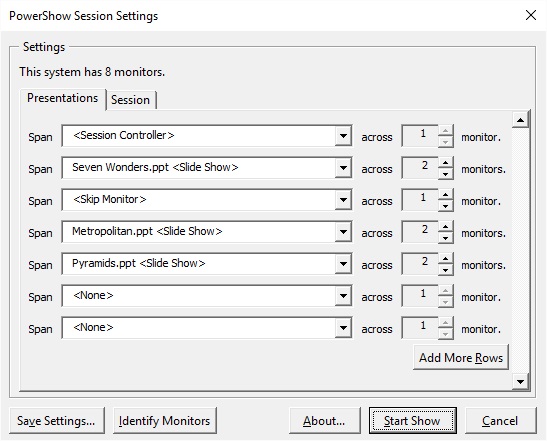
The first row in this dialog box corresponds to row number 1.
Examples
In the above PowerShow Session Settings dialog box, Seven
Wonders.ppt is at row 2, Metropolitan.ppt is at row 4 and Pyramids.ppt is at row 5.
The following are example commands and their effects:
PowerShowControl first 4
This instructs PowerShow to go to the first slide for the slide show
of row 4. The effect would be to navigate Metropolitan.ppt to first slide.
PowerShowControl next 2
This instructs PowerShow to go to the next slide for the slide show
of row 2. This would navigate Seven Wonders.ppt to next slide.