 OfficeOne PowerShow
Spanning Videos
Microsoft PowerPoint uses the MCI Media Player for playing the movies
and sounds. The MCI Media Player is different from Windows Media Player
(although the name sounds very similar). Windows Media Player has a
number of advantages over MCI Media Player. Some of them are:
- Windows Media Player supports more media formats than the Media Player.
- Movies can span multiple monitors.
- Windows Media Player provides a host of controls like Play, Pause/Resume, Stop, Volume Control, Tracker, etc.
Since Windows Media Player is an ActiveX control on the slide, the
disadvantage is that PowerPoint does not allow Custom Animation and
Action Settings for ActiveX controls. This is true even for the VBA
controls that ship with PowerPoint.
PowerShow enables you to use Windows Media Player to play movies or
sound files on PowerPoint slides through the
Insert | Windows Media Player Movie button.
Shortcuts for
PowerPoint introduces configurable keyboard shortcuts to enable you
to pause all videos running on all running slide shows. It also
introduces shortcuts that can resume all the paused videos or play all
the stopped ones.
The Insert Movie dialog box looks something like this:
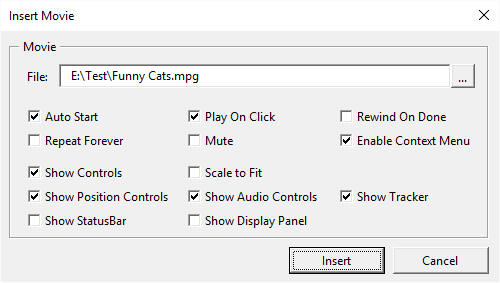
Through this dialog, PowerShow enables you to configure some of the
parameters of Windows Media Player:
- File: Type in the full path to the movie or sound file.
- Auto Start starts the movie as soon as you arrive on the slide on which the movie is inserted.
- Play On Click allows you to click on the movie during slide shows to play the movie. Available with Windows Media Player 7 only.
- Rewind On Done rewinds the movie when it finishes playing.
- Repeat Forever keeps playing the movie repeatedly.
- Mute silences the movie's sounds.
- Enable Context Menu enables the context-sensitive menu that appears when you press the right-click mouse button on the movie.
- Show Controls displays the movie and sound navigation, audio and tracker controls while playing the movie. You can optionally control the display of each of these controls individually.
- Show Position Controls enables you to display the Play, Pause/Resume, Stop, Rewind, Forward and other movie and sound navigation controls.
- Show Audio Controls enables you to display Volume and Mute controls.
- Show Tracker enables you to display the movie/sound tracker.
- Show StatusBar enables you to show the status of the movie or sound. Available with Windows Media Player 7 only.
- Show Display Panel shows the properties of the movie or sound. Available with Windows Media Player 7 only.