 OfficeOne PowerViewer
Answers to Frequently Asked Questions
Here are some of the frequently asked questions about PowerViewer and their answers.
PowerViewer
- Which versions of Microsoft PowerPoint Viewer does PowerViewer support?
- Which versions of Microsoft Windows does PowerViewer support?
- Which languages does PowerViewer support?
- Can I store the selections that I have made in the PowerViewer for future?
- How do I use the saved settings?
- I have more than one monitor connected to my machine. But PowerViewer reports only one monitor. What could be the problem?
Multiple Monitors
PowerViewer is supported on the following versions:
PowerPoint Viewer 2010 is preferable as it supports PowerPoint 2007
formats (.pptx, .ppsx, .pptm, .ppsm, etc.) natively. It also supports the
new features introduced by PowerPoint 2010.
PowerViewer is supported on the following versions:
- Microsoft Windows 10
- Microsoft Windows 8.1
- Microsoft Windows 8
- Microsoft Windows 7
PowerViewer is available in the following languages: English, French,
German, Dutch, Japanese. The translations from English are done with
help from Google Translator
and Microsoft Translator. Since
these are machine translators, there could be some incorrect
translations. Please email
OfficeOne in case you
find an incorrect translation or if you have a better translation.
Technical support for PowerViewer is available in English only.
Yes. To save the selections, click the
Save Settings... button after configuring various settings in
PowerViewer. You will be prompted to provide the file name in which the
settings will be saved. PowerViewer stores the settings in a file with
the extension .pssv.
The stored settings include the full path to the selected presentations.
The saved settings can be recalled using
Load Settings... button. You will be prompted with a dialog box to
provide the file name that has the stored PowerViewer settings.
Its actually Windows that it seeing only
one monitor! There are a couple of possibilities that could be causing
the problem.
Possibility 1:
Windows isn't configured to use the other
monitor. This is the most commonly encountered problem. Follow these
steps to configure Windows to use the other monitor:
- Go to Display Properties dialog box by selecting Start | Settings | Control Panel menu item and launching Display applet.
- Go to the Settings tab.
- Click on monitor 2 and check against the Extend my Windows
desktop onto this monitor check box as shown below.
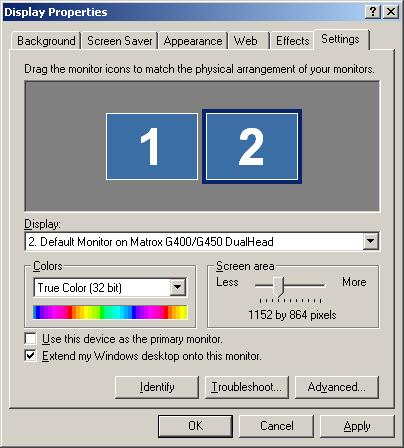
- Click OK.
Possibility 2:
Click on the following links to know more about multi-monitor feature:
- Multi-monitor concepts: A brief tutorial that explains the concepts involved in multi-monitor feature.
- Multi-monitor website: A website dedicated to multiple monitors.
- A brief note on how to configure multi-monitor support in Windows XP at Microsoft website: Expand Your Workspace with Multiple Monitors and Dualview
The following vendors manufacture multi-monitor cards:
- ATI: ATI manufactures true dual-head and quad-head cards - ATI FirePro 2450.
- Matrox: Matrox manufactures true dual-head cards - Millennium G450, Millennium G550, Matrox P650 and P750, Matrox Parhelia.
- NVidia: NVidia's MX and Go series of graphic cards have multi-monitor features. GeForce2 and GeForce4 both have MX and Go variants.
Click here to
see a range of multi-monitor cards available through Amazon.