 OfficeOne Send To Publisher 3.0
Product Details
Microsoft Publisher supports
features to enable you to create publications that can be printed in a
variety of formats - including booklets and handouts. Send To
Publisher is a PowerPoint add-in that enables you to send
PowerPoint slides to Publisher publications. The slides can be exported
in a variety of formats including PowerPoint slides, PNG images, JPEG
images and WMF images. You can choose to have the Publisher publications
have the notes corresponding to the slides on the same page next to or below the
slide.
Using Send To Publisher add-in
- After installing Send To Publisher add-in in PowerPoint,
For PowerPoint 2016, 2013, 2010 and 2007, click Send to Publisher item in Publisher group in the Home tab.
For PowerPoint 2003 and 2002, select File | Send To | Microsoft Publisher... menu item.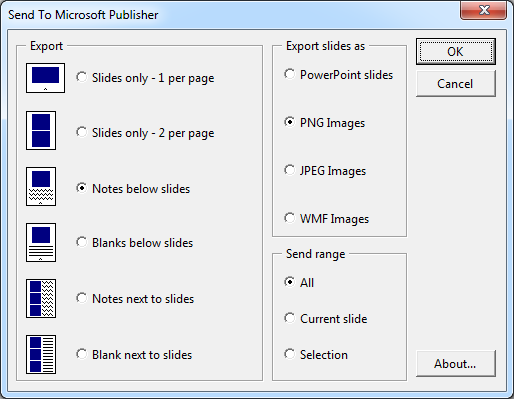
- Select what you want to export from the following options:
- Slides only: Each PowerPoint slide will be exported on a separate Publisher page. The slide occupies full page.
- Notes below slides: Each PowerPoint slide will be exported on a separate Publisher page. The slide occupies half of the page and the other half is populated with notes for that slide.
- Blank below slides: Each PowerPoint slide will be exported on a separate Publisher page. The slide occupies half of the page and the other half is kept blank to allow people to take their own notes.
- Notes next to slides: Each Publisher page will have 3 PowerPoint slides. The 3 slides are stacked one below the other. Each slide occupies left half of the page and the right half is populated with notes for that slide.
- Blank next to slides: Each Publisher page will have 3 PowerPoint slides. The 3 slides are stacked one below the other. Each slide occupies left half of the page and the right half is kept blank to allow people to take their own notes.
- Also select whether you want to export as PowerPoint slides, PNG
images of the slides, JPEG images of the slides or WMF images of the
slides.
- Exporting as PowerPoint slides gets you PowerPoint slide objects in Publisher documents. In Publisher, you can double-click on those objects to edit those slides individually in PowerPoint.
- Exporting slides as PNG or JPEG images would give you Publisher documents with non-editable slide content. Use PNG image if your slides contain text content as PNG format converts text to image a lot better than JPEG format.
- Exporting slides as WMF images would give you scalable vector graphics in Publisher documents. Use this format if your slides don't contain pictures and photographs. WMF images are suitable for slides with text, graphs and other scalable objects.
- Click OK button.
- The slides would be exported to a new Publisher publication. After the export process is complete, the publication would be available to you. Please ensure that you save the publication to appropriate location.
Click here to visit the download page.