 OfficeOne ProTools for PowerPoint
ProTools Shape Adjustments
The different parts of the ProTools Shape Adjustments group are as follows:
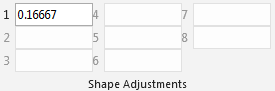
Many of the AutoShapes (Basic Shapes, Block Arrows, Callouts, etc.) allow
for adjustments. The adjustments can be done using the mouse pointer by
manipulating small yellow diamond ( ). This
can be a tedious process and may not get you 100% precision required for
professional presentations. The Shape Adjustments toolbar allows you to
modify the adjustments of the shape using precise numbers. There are in all
8 adjustments that you can make to a shape. Not all shapes support all 8
adjustments. OfficeOne ProTools for PowerPoint activates only the
adjustments that are supported by the selected shape.
). This
can be a tedious process and may not get you 100% precision required for
professional presentations. The Shape Adjustments toolbar allows you to
modify the adjustments of the shape using precise numbers. There are in all
8 adjustments that you can make to a shape. Not all shapes support all 8
adjustments. OfficeOne ProTools for PowerPoint activates only the
adjustments that are supported by the selected shape.
). This
can be a tedious process and may not get you 100% precision required for
professional presentations. The Shape Adjustments toolbar allows you to
modify the adjustments of the shape using precise numbers. There are in all
8 adjustments that you can make to a shape. Not all shapes support all 8
adjustments. OfficeOne ProTools for PowerPoint activates only the
adjustments that are supported by the selected shape.The shape adjustments can be modified even when the shapes are part of a
group. This is very powerful since you don't have to dismantle the group of
shapes to do these changes. Dismantling the group has an undesirable slide effect of
removing the animations and effects that had been assigned to the group.