Home Products Tips VBA FAQ Utilities Licensing Disclaimer Privacy Policy Links

OfficeOne Shortcut Manager for Excel

Overview
Information
Download
Install
Purchase
FAQ
SDK

Tips

Information

The following features are introduced by Shortcut Manager in the Excel environment:

Feature 1: Define your own keyboard shortcuts to menu items and recorded macros

Microsoft Excel simplifies recurring tasks through the use of macros. The macros themselves can be automatically generated by Excel by using the recording facility (Tools | Macro | Record New Macro...). Macros can also be written in the Visual Basic Editor using VBA.

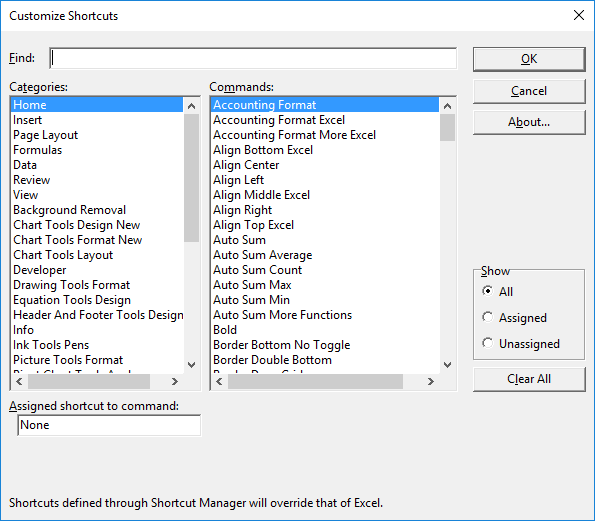
The macro code needs to be invoked from one of the menu items in the Excel user interface. There is no way to invoke a macro using keyboard shortcuts. Using Shortcut Manager, you can assign keyboard shortcuts to existing menu items, recorded macros and macros written in VBE even if they don't appear in the Excel user interface.

Feature 2: Define shortcuts to commands that aren't available directly through the Excel User Interface

Excel has a number of commands that are not readily available from its user interface. While some of these commands can be inserted into toolbars and menus through the Customize dialog box, some others are available only on other toolbars. There are still some others that are hidden from the user interface and available only through code. Shortcut Manager for Excel surfaces those and enables you to define keyboard shortcuts to invoke these commands.

Many of these commands are active only for a certain context. Shortcut Manager invokes these commands during these contexts only.

Feature 3: Define shortcuts to password protected VBA macros

Microsoft Excel allows you to password protect the VBA macros. This prevents the macros from being accidentally modified. Shortcut Manager allows you to create keyboard shortcuts to password protected macros. Click here for more information on how to do this.

Feature 4: Define shortcuts in Workbook Templates. Workbooks created from these templates automatically inherit these shortcuts

The keyboard shortcuts can be defined while creating the workbook templates. These shortcut definitions are stored with the templates. When presentations are created from such a template, the shortcut definitions are copied to the presentation.

Click here to download the addin.


Contact OfficeOne on email at officeone@mvps.org. Copyright © 2001-2009 OfficeOne. All rights reserved.

free hit counter