How do I use the slide sorter view to change the slide on the slide show?
The slide sorter (View | Slide Sorter menu item) offers a convenient way of viewing many slides in a single view. Dual monitor configurations enable you to mean mean the slide show to the audience while you see the slide sorter view on your primary monitor or laptop. You might want to click a slide in the slide sorter view and make the slide slide move to that slide. The PowerShow add-in offers you a way to do this.
The following configuration steps enable you to set this up with PowerShow:
- Select Slide Show | Power Show... menu item.
- On the Presentations tab, set up the configuration as follows:
- Select <Skip Monitor> and 1 monitor.
- Select your presentation <Slide Show> in the second
row and 1 monitor.
- On the Session tab, do the following:
- Place a check against Slide show follows slide sorter view box.
- Clear Show Slide Thumbnail box.
- Clear Show Next Slide Thumbnail box.
- Clear Full Screen Session Controller box.
- Clear Slide design view follows slide show box. The dialog
box should look like the following:
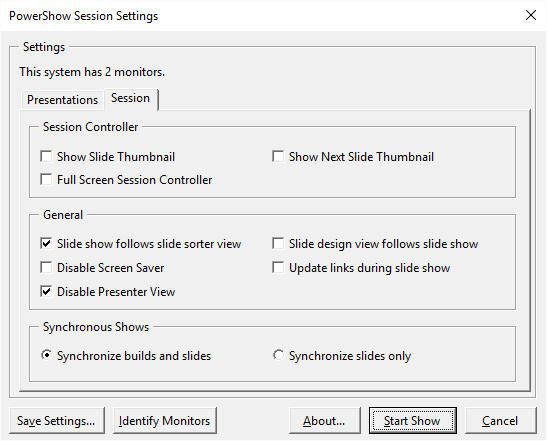
- Click Start Show button.
This configuration will enable you to use the slide sorter view to navigate the slide show.