 OfficeOne ProTools for PowerPoint
ProTools Slide Properties
The different parts of the ProTools Slide Properties tab are as follows:
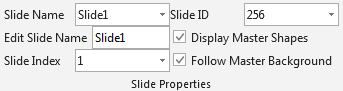
This tab group allows you to:
- Navigate to a slide using its name.
- Rename slides: Change the name of the slide from the one that PowerPoint gave to the one that you want.
- Navigate to a slide using its index or the slide ID.
- Select whether the slide should display
the shapes present on the Master slide. The native way to get the
same through PowerPoint is to use the following steps:
- Select Format | Background... menu item.
- Check Omit background graphics from master box.
- Click OK button.
- Select whether the slide should have the background displayed from the Master slide.