 OfficeOne PowerShow
Troubleshooting
Here are some of the frequently asked questions about PowerShow and their answers.
- I have installed OfficeOne PowerShow but I don't get the buttons on the ribbon or menu items on the menu. What could be the issue?
- I have more than one monitor connected to my machine. But PowerShow reports only one monitor. What could be the problem?
- I have only 4 monitors connected to the system but PowerShow reports 5 monitors. What is going on?
- Multi-Panel Show keeps reporting "monitors are not having the same resolution" even though all monitors have same resolution. What could be the issue?
- I am trying to register the license key but PowerShow keeps telling me that the license key has expired. What could be the issue?
- PowerShow is still not working for me, what should I do?
Most probably, the issue would be that PowerShow has been disabled. In such a
case, you can re-enable PowerShow using the following steps:
| PowerPoint 2019, 2016, 2013, 2010 | PowerPoint 2007 |
|---|---|
|
|
Its actually Windows that it seeing only one monitor! There are a
couple of possibilities that could be causing the problem.
Possibility 1:
Windows isn't configured to use the other monitor. This is the most
commonly encountered problem. Follow these steps to configure Windows to
use the other monitor:
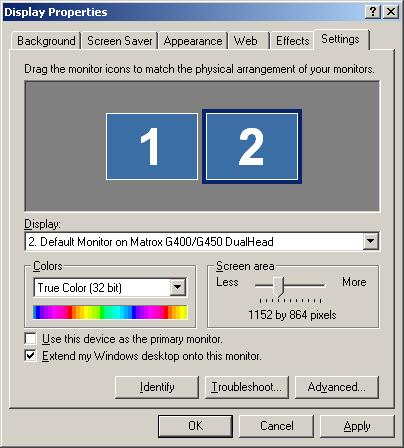
- Go to Display Properties dialog box by selecting Start | Settings | Control Panel menu item and launching Displayapplet.
- Go to the Settings tab.
- Click on monitor 2 and check against the Extend my Windows
desktop onto this monitor check box as shown below.
- Click OK.
Possibility 2:
The display isn't configured for true multi-monitor mode. Visit
here
to configure your machine for true multi-monitor mode. A detailed
discussion on true multi-monitor mode is available
here.
Some display cards do not support true multi-monitor modes but still
support multiple monitors with the ability to display different content on
different monitors. PowerShow offers TickerShow feature that allows you to
run multiple slide shows simultaneously with such display cards. Matrox
DualHead2Go is one such device that splits video signals across multiple
monitors. Visit the following pages for step-by-step instructions on how to
display multiple slide shows simultaneously with such display cards.
Although these tips are tuned for Matrox DualHead2Go device, the steps are
similar for any display card exhibiting such characteristics:
Q3.
I have only 4 monitors connected to the system but PowerShow reports 5
monitors. What is going on?
PowerShow may be finding virtual monitors. Virtual monitors are created
by remote desktop software products like logmein, Microsoft Net Meeting,
VNC, etc. These virtual monitors may interfere with the operations of
PowerShow and Multi-Panel Show. Please ensure that these software
products are either not running or are uninstalled from the system
before running PowerPoint.
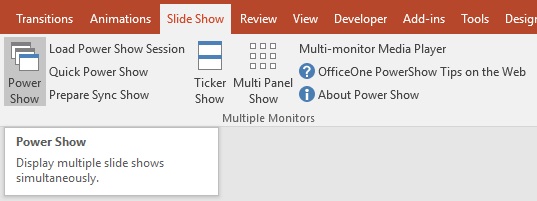
You need to check if PowerShow is finding virtual monitors. Start
PowerShow by selecting Slide Show | Power Show item.
In the PowerShow Session Settings dialog box, check the number of monitors that
PowerShow reports. If PowerShow is reporting more monitors than those
connected to the system, you may have virtual monitors present on the
system.
Virtual monitors are created by remote desktop software products like
logmein, Microsoft Net Meeting, VNC, etc. These virtual monitors may
interfere with the operations of PowerShow and Multi-Panel Show. Please
ensure that these software products are either not running or are
uninstalled from the system before running PowerPoint.
Most probably, the issue would be that PowerShow has been disabled. In such a
case, you can re-enable PowerShow using the following steps:
| PowerPoint 2019, 2016, 2013, 2010 | PowerPoint 2007 |
|---|---|
|
|
The PowerShow Tutorial and
PowerShow Tips provide you
step-by-step instructions on how to use PowerShow in various scenarios
for various tasks.
If PowerShow still does not meet your requirements, please send an email
to officeone@officeoneonline.com.
Include a description of your requirements and the issue that you are
facing.